How to Build an AI-Powered Knowledge Base for Your Organization ?

How to Build an AI-Powered Knowledge Base for Your Organization (Using RAG)
Most organizations already have knowledge. it's just buried in PDFs, policies, and documents that no one wants to read.
What if instead of searching through files, you could just ask a question and get an answer instantly?
That’s exactly what I built: a local AI-powered knowledge base using Retrieval-Augmented Generation (RAG)
What did I use ?
- Flask - Web interface
- ChromaDB - Vector database
- Ollama - local LLM provider
- PyPDF2 - Pdf extraction tool
- Hashlib - Hashing files to track changes
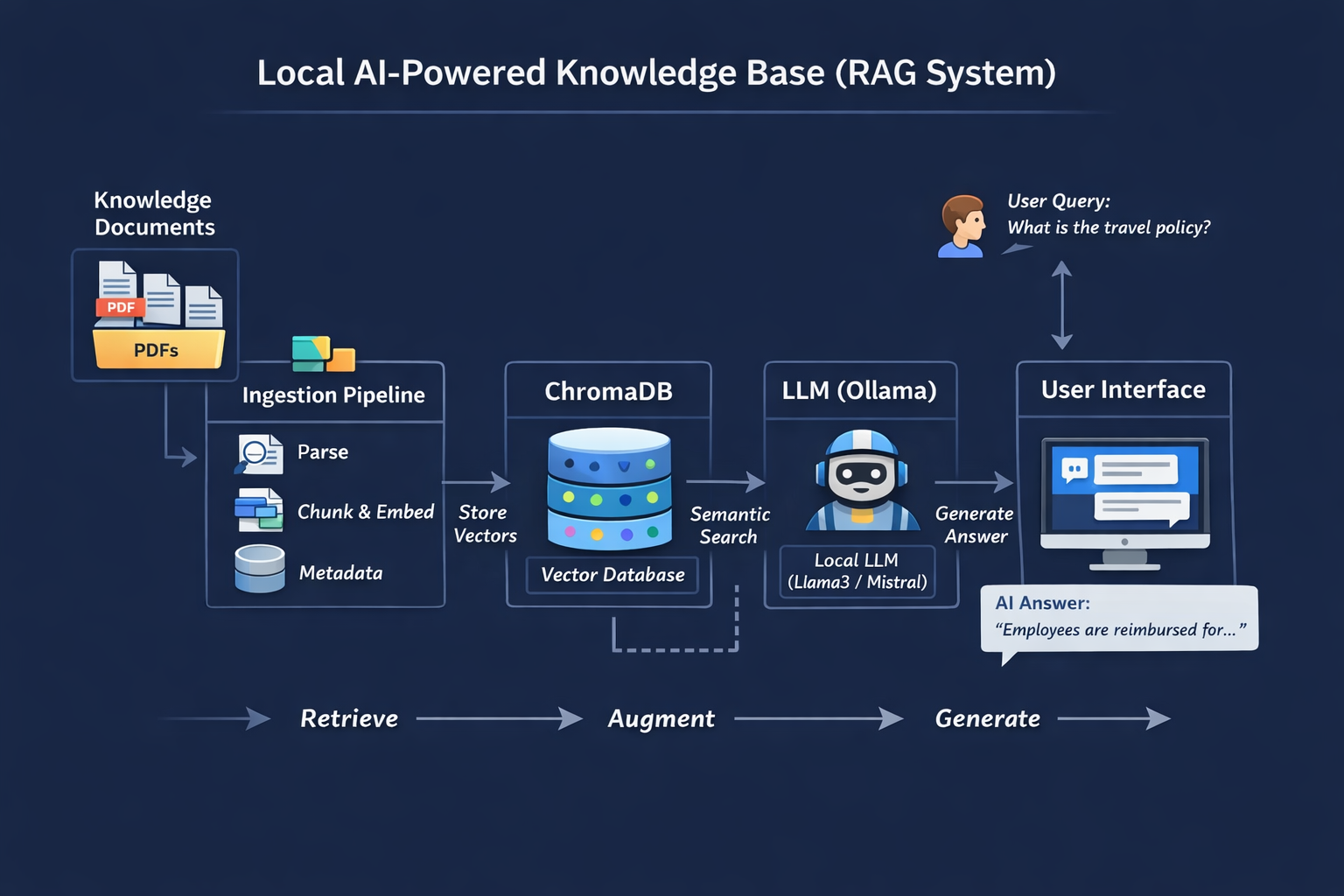
Architecture
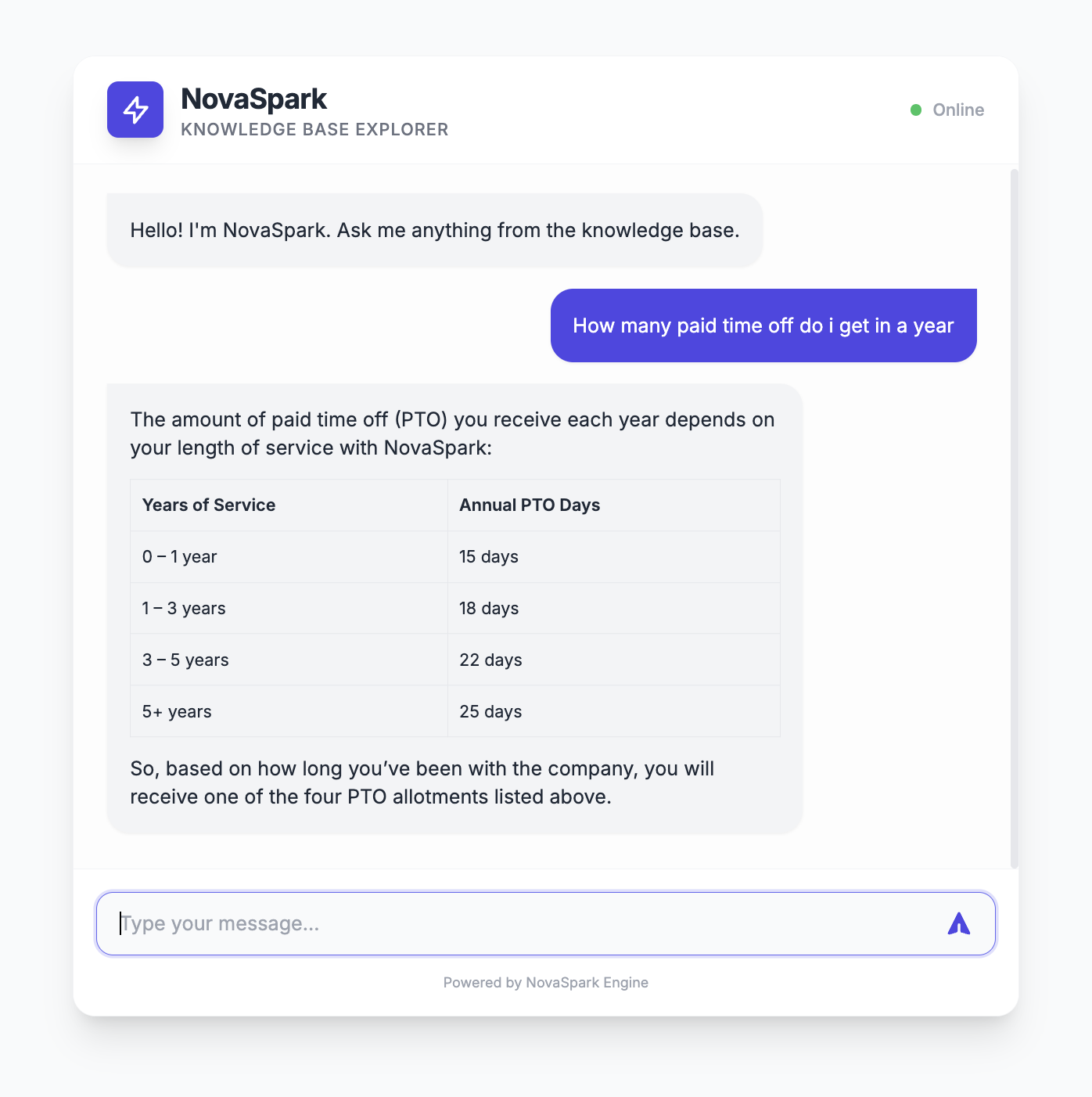
End Product
Github URL: https://github.com/gitsaugat/ai-powered-company-knowledge-base
The final system is a chat-based AI assistant for your organization’s knowledge.
Instead of searching through PDFs or asking HR, users simply type a question:
“What is the leave policy?”
The system:
- Searches relevant document chunks using semantic search
- Retrieves the most relevant sections
- Sends them to an LLM
- Generates a precise answer grounded in your documents
- What the user experiences
- A simple chat interface
- Fast, accurate answers
- No need to read long documents
What’s happening behind the scenes ?
Documents → chunked → embedded → stored
Query → matched → context → LLM → answer
Final result
A centralized, intelligent knowledge layer for your organization.
Key impact
Reduces repetitive questions
Saves time
Makes knowledge instantly accessible
Project Structure
main_project
├── knowledge
│   ├── 01_NovaSpark_Company_Overview.pdf
│   ├── 02_NovaSpark_HR_Policy_Manual.pdf
│   ├── 03_NovaSpark_Product_Technical_Docs.pdf
│   ├── 04_NovaSpark_Financial_Report_FY2025.pdf
│   └── 05_NovaSpark_Employee_Handbook.pdf
├── project
│   ├── __init__.py
│   ├── utils
│   │   ├── __init__.py
│   │   ├── chroma.py
│   │   ├── llm.py
│   │   └── vars.py
│   └── web
│       ├── __init__.py
│       ├── server.py
│       └── templates
│           └── main.html
├── readme.md
└── requiremnts.txt
We organize the project into clear layers: documents (knowledge), backend logic (utils), and web interface (web). This separation keeps ingestion, retrieval, and UI independent and maintainable.
Setup Virtual Environment
We create a virtual environment and install required libraries. This ensures dependency isolation and reproducibility of the project.
python3 -m venv env or virtualenv -p python3 envInstall dependencies
source env/bin/activate
pip install chromadb
pip install flask
pip install pypdf2
pip install ollama
Note: Ollama should also be installed separately : Download Ollama
Setup Chroma Client: project/utils/chroma.py
This layer handles vector storage and retrieval. ChromaDB stores document embeddings and allows us to perform semantic search efficiently.
We extract raw text from PDFs so it can be processed. This is the first step in turning unstructured documents into usable data.
Large documents are split into smaller chunks. This improves retrieval accuracy by allowing the system to match specific sections instead of entire documents.
We generate a hash for each file to detect changes. This prevents reprocessing unchanged files and keeps the database clean.
Each chunk is stored along with metadata. This allows us to retrieve relevant information later and trace it back to the original document.
We compare stored hashes with current files. If a file changes, we delete outdated data and reprocess it to keep the system consistent.
User queries are converted into embeddings and matched against stored vectors. The system retrieves the most relevant chunks based on meaning, not keywords.
import os
import chromadb
import uuid
import datetime
import hashlib
from .vars import CHROMA_DB_DIR,KNOWLEDGE_DIR
import PyPDF2


class ChromaClient:

    def __init__(self):

        self.client = chromadb.PersistentClient(path=CHROMA_DB_DIR)
        self.collection = self.client.get_or_create_collection(name="knowledge_base")


    def add_document(self, document,file_path,file_name,hash):
        print("added chunk of ",file_path)
        self.collection.add(
            documents=[document],
            ids=[str(uuid.uuid4())],
            metadatas=[{"source": file_name,'hash':hash}]
        )

    def hash_file(self,path):
        hasher = hashlib.sha256()
        with open(path, "rb") as f:
            while chunk := f.read(8192):
                hasher.update(chunk)
        return hasher.hexdigest()

    def query_document(self,query):
        results = self.collection.query(
            query_texts=[query],
            n_results=5
        )
        return results

    def chunk_text(self, text, size=300, overlap=100):
        chunks = []
        start = 0
        while start < len(text):
            end = start + size
            chunks.append(text[start:end])
            start += size - overlap
        return chunks

    def read_pdf(self,path):
        with open(path, "rb") as f:
            reader = PyPDF2.PdfReader(f)
            text = ""
            for page in reader.pages:
                text += page.extract_text()
            f.close()
            return text

    def query_document(self,query):

        results = self.collection.query(
            query_texts=[query],
            n_results=5
        )
        return results

    def remove_outdated_documents(self):
        files = os.listdir(KNOWLEDGE_DIR)

        for file in files:
            file_path = KNOWLEDGE_DIR / file
            current_hash = self.hash_file(file_path)

            existing = self.collection.get(where={"source": file})

            if existing["metadatas"]:
                stored_hash = existing["metadatas"][0]["hash"]

                if stored_hash != current_hash:
                    print("deleted outdated file",file_path)
                    self.collection.delete(where={"source": file})

    def store_documents(self):

        files = os.listdir(KNOWLEDGE_DIR)

        for file in files:
            file_path = KNOWLEDGE_DIR / file
            hash = self.hash_file(file_path)

            existing = self.collection.get(where={"hash": hash})

            if existing["ids"]:
                print("file already exists-skipping",file_path)
                continue

            contents = self.read_pdf(file_path)
            chunks = self.chunk_text(contents)

            for chunk in chunks:
                self.add_document(chunk,file_path,file,hash)
Setup LLM: project/utils/llm.py
We pass retrieved context to a local LLM. The model generates answers using only the provided information to ensure accuracy.
import ollama

def generate_response(context,query):

    prompt = f"""
            You are an knowledge base model for the Organization NovaSpark.
            Answer the question using ONLY the context below.
            If the answer is not in the context, say "I don't know please reach out to relavant department".

            Context:
            {context}

            Question:
            {query}
    """
    response = ollama.chat(model='gpt-oss:120b-cloud', messages=[
        {'role': 'user', 'content': prompt},
    ])
    return response['message']['content']
Setup Vars: project/utils/vars.py
from pathlib import Path

BASE_DIR = Path(__file__).resolve().parent.parent.parent

PROJECT_DIR = BASE_DIR / "project"

KNOWLEDGE_DIR = BASE_DIR / "knowledge"

CHROMA_DB_DIR = BASE_DIR / "chroma_db"
Flask API & UI
Flask provides a simple interface for users to interact with the system. It connects the frontend chat UI with the backend retrieval and generation pipeline.
Setup HTML template project/web/templates/main.py
<!DOCTYPE html>
<html lang="en">
<head>
    <meta charset="UTF-8">
    <meta name="viewport" content="width=device-width, initial-scale=1.0">
    <title>NovaSpark Knowledge Base Chat</title>
    <script src="https://cdn.tailwindcss.com"></script>
    <script src="https://cdn.jsdelivr.net/npm/marked/marked.min.js"></script>
    <link href="https://fonts.googleapis.com/css2?family=Inter:wght@300;400;500;600;700&display=swap" rel="stylesheet">
    <style>
        body {
            font-family: 'Inter', sans-serif;
            background-color: #f9fafb;
        }
        .chat-container {
            height: 500px;
        }
        .message-bubble {
            max-width: 80%;
            transition: all 0.2s ease-in-out;
        }
        .message-bubble:hover {
            transform: translateY(-1px);
        }
        .custom-scrollbar::-webkit-scrollbar {
            width: 6px;
        }
        .custom-scrollbar::-webkit-scrollbar-track {
            background: transparent;
        }
        .custom-scrollbar::-webkit-scrollbar-thumb {
            background: #e5e7eb;
            border-radius: 10px;
        }
        .custom-scrollbar::-webkit-scrollbar-thumb:hover {
            background: #d1d5db;
        }
        @keyframes fadeIn {
            from { opacity: 0; transform: translateY(10px); }
            to { opacity: 1; transform: translateY(0); }
        }
        .animate-fadeIn {
            animation: fadeIn 0.3s ease-out forwards;
        }
        /* Markdown Styling */
        .message-content h1, .message-content h2, .message-content h3 { font-weight: bold; margin-top: 0.5rem; margin-bottom: 0.25rem; }
        .message-content p { margin-bottom: 0.5rem; }
        .message-content p:last-child { margin-bottom: 0; }
        .message-content ul, .message-content ol { margin-left: 1.25rem; margin-bottom: 0.5rem; list-style-type: disc; }
        .message-content table { width: 100%; border-collapse: collapse; margin-top: 0.75rem; margin-bottom: 0.75rem; font-size: 0.75rem; }
        .message-content th, .message-content td { border: 1px solid #e5e7eb; padding: 0.5rem; text-align: left; }
        .message-content th { background-color: #f3f4f6; font-weight: 600; }
        .message-content code { background-color: #f3f4f6; padding: 0.1rem 0.3rem; border-radius: 0.25rem; font-family: monospace; }
        .message-content blockquote { border-left: 3px solid #e5e7eb; padding-left: 0.75rem; color: #6b7280; font-style: italic; }
    </style>
</head>
<body class="bg-gray-50 flex flex-col items-center justify-center min-h-screen p-4">

    <!-- Main Card -->
    <!-- Main Card -->
    <div class="w-full max-w-2xl bg-white rounded-2xl shadow-xl overflow-hidden flex flex-col border border-gray-100 my-8">

        <!-- Header -->
        <header class="bg-white border-b border-gray-100 px-6 py-4 flex items-center justify-between">
            <div class="flex items-center space-x-3">
                <div class="w-10 h-10 bg-indigo-600 rounded-lg flex items-center justify-center text-white shadow-lg">
                    <svg xmlns="http://www.w3.org/2000/svg" class="h-6 w-6" fill="none" viewBox="0 0 24 24" stroke="currentColor">
                        <path stroke-linecap="round" stroke-linejoin="round" stroke-width="2" d="M13 10V3L4 14h7v7l9-11h-7z" />
                    </svg>
                </div>
                <div>
                    <h1 class="text-xl font-bold text-gray-800 tracking-tight">NovaSpark</h1>
                    <p class="text-xs text-gray-500 font-medium uppercase tracking-wider">Knowledge Base Explorer</p>
                </div>
            </div>
            <div class="flex items-center space-x-2">
                <span class="flex h-2 w-2 rounded-full bg-green-500"></span>
                <span class="text-xs text-gray-400 font-medium">Online</span>
            </div>
        </header>

        <!-- Chat Area -->
        <div id="chat-messages" class="chat-container custom-scrollbar overflow-y-auto p-6 space-y-4 bg-[#fdfdfd]">
            <!-- Welcome Message -->
            <div class="flex justify-start animate-fadeIn">
                <div class="message-bubble bg-gray-100 text-gray-800 p-4 rounded-2xl rounded-tl-none shadow-sm">
                    <p class="text-sm">Hello! I'm NovaSpark. Ask me anything from the knowledge base.</p>
                </div>
            </div>
        </div>

        <!-- Input Area -->
        <div class="p-4 bg-white border-t border-gray-100">
            <form id="chat-form" class="relative flex items-center">
                <input
                    type="text"
                    id="user-input"
                    placeholder="Type your message..."
                    class="w-full bg-gray-50 border border-gray-200 rounded-xl px-4 py-3 pr-12 focus:outline-none focus:ring-2 focus:ring-indigo-500/20 focus:border-indigo-500 transition-all text-sm placeholder-gray-400"
                    autocomplete="off"
                >
                <button
                    type="submit"
                    class="absolute right-2 p-2 text-indigo-600 hover:bg-indigo-50 rounded-lg transition-colors"
                >
                    <svg xmlns="http://www.w3.org/2000/svg" class="h-5 w-5" viewBox="0 0 20 20" fill="currentColor">
                        <path d="M10.894 2.553a1 1 0 00-1.788 0l-7 14a1 1 0 001.169 1.409l5-1.429A1 1 0 009 15.571V11a1 1 0 112 0v4.571a1 1 0 00.725.962l5 1.428a1 1 0 001.17-1.408l-7-14z" />
                    </svg>
                </button>
            </form>
            <p class="text-[10px] text-center text-gray-400 mt-2 mt-3">Powered by NovaSpark Engine</p>
        </div>
    </div>

    <script>
        const chatForm = document.getElementById('chat-form');
        const userInput = document.getElementById('user-input');
        const chatMessages = document.getElementById('chat-messages');

        function addMessage(message, isUser = false) {
            const wrapper = document.createElement('div');
            wrapper.className = `flex ${isUser ? 'justify-end' : 'justify-start'} animate-fadeIn`;

            const bubble = document.createElement('div');
            bubble.className = `message-bubble p-4 rounded-2xl shadow-sm text-sm overflow-x-auto ${
                isUser
                ? 'bg-indigo-600 text-white rounded-tr-none'
                : 'bg-gray-100 text-gray-800 rounded-tl-none'
            }`;

            const content = document.createElement('div');
            content.className = 'message-content';
            if (isUser) {
                content.textContent = message;
            } else {
                content.innerHTML = marked.parse(message);
            }

            bubble.appendChild(content);
            wrapper.appendChild(bubble);
            chatMessages.appendChild(wrapper);

            // Scroll to bottom
            chatMessages.scrollTop = chatMessages.scrollHeight;
        }

        function addTypingIndicator() {
            const indicator = document.createElement('div');
            indicator.id = 'typing-indicator';
            indicator.className = 'flex justify-start animate-fadeIn';
            indicator.innerHTML = `
                <div class="bg-gray-100 p-3 rounded-2xl rounded-tl-none flex space-x-1 items-center">
                    <div class="w-1.5 h-1.5 bg-gray-400 rounded-full animate-bounce"></div>
                    <div class="w-1.5 h-1.5 bg-gray-400 rounded-full animate-bounce" style="animation-delay: 0.2s"></div>
                    <div class="w-1.5 h-1.5 bg-gray-400 rounded-full animate-bounce" style="animation-delay: 0.4s"></div>
                </div>
            `;
            chatMessages.appendChild(indicator);
            chatMessages.scrollTop = chatMessages.scrollHeight;
        }

        function removeTypingIndicator() {
            const indicator = document.getElementById('typing-indicator');
            if (indicator) indicator.remove();
        }

        chatForm.addEventListener('submit', async (e) => {
            e.preventDefault();
            const message = userInput.value.trim();
            if (!message) return;

            addMessage(message, true);
            userInput.value = '';

            addTypingIndicator();

            try {
                const response = await fetch('/chat', {
                    method: 'POST',
                    headers: {
                        'Content-Type': 'application/json',
                    },
                    body: JSON.stringify({ message }),
                });

                const data = await response.json();
                removeTypingIndicator();
                addMessage(data.reply);
            } catch (error) {
                console.error('Error:', error);
                removeTypingIndicator();
                addMessage("Sorry, I encountered an error connecting to the knowledge base.");
            }
        });
    </script>
</body>
</html>
Setup flask server: project/web/server.py
import sys
from pathlib import Path

root_dir = Path(__file__).resolve().parent.parent
if str(root_dir) not in sys.path:
    sys.path.append(str(root_dir))

from utils.chroma import ChromaClient
from utils.llm import generate_response
from flask import Flask, render_template, request, jsonify
import random
import time

app = Flask(__name__)
client = ChromaClient()

@app.route('/')
def index():
    client.store_documents()
    client.remove_outdated_documents()
    return render_template('main.html')

@app.route('/chat', methods=['POST'])
def chat():
    user_message = request.json.get('message')
    results = client.query_document(user_message)
    context = "\n".join(results['documents'][0])
    reply = generate_response(context,user_message)

    time.sleep(0.5)

    return jsonify({
        'reply': reply
    })

if __name__ == '__main__':
    app.run(debug=True, port=5001)
Run the server
python server.py 💬 End-to-End Flow
User → Query → Retrieve relevant chunks → Send to LLM → Generate answer.
This completes the full RAG pipeline.
You should also read:
Stop Writing Hardcoded SQL. Build Metadata-Driven Engines.
I see too many Data Engineers manually writing the same SELECT, LEFT JOIN, and WHERE clauses for every new pipeline. If you’re copy-pasting SQL, you aren’t engineering; you’re transcribing. I’ve shifted my development workflow to a Metadata-Driven Approach using Jinja2. By decoupling the Business Logic (JSON/YAML) from the Execution Logic…
Continue reading...Reclaim Your Mac Storage
How I Reclaimed 90GB of "System Data" on my Mac (The Data Engineer Way) 💻🚀 If you're a developer or data engineer on macOS, you know the "System Data" nightmare: a massive, mysterious 100GB+ bar that you can't click on or easily clean. I just dropped my System Data from…
Continue reading...